Testset Generation for RAG
This simple guide will help you generate a testset for evaluating your RAG pipeline using your own documents.
Quickstart
Let's walk through a quick example of generating a testset for a RAG pipeline. Following that we will explore the main components of the testset generation pipeline.
Load Sample Documents
For the sake of this tutorial we will use sample documents from this repository. You can replace this with your own documents.
Load documents
Now we will load the documents from the sample dataset. Any object exposing page_content and metadata works, so LangChain loaders are fine as they are; for documents with other attribute names, such as LlamaIndex's, pass a document_adapter (see below). Here we build ragas Document objects directly, with no extra dependency.
from pathlib import Path

from ragas.testset.document import Document

path = "Sample_Docs_Markdown/"
docs = [
    Document(page_content=p.read_text(), metadata={"source": str(p)})
    for p in Path(path).rglob("*.md")
]
Choose your LLM
You may choose to use any LLM of your choice
Install the OpenAI SDK:
Set your API key:
Build the evaluator LLM with llm_factory:
Set your API key:
No Anthropic SDK is needed: the call goes through LiteLLM.
Embeddings default to LiteLLM, which resolves credentials from the environment:
For Vertex AI, use llm_factory("vertex_ai/gemini-3.6-flash") with your
Google Cloud credentials (Application Default Credentials, or
vertex_project= / vertex_location=). No Google SDK is needed.
Embeddings default to LiteLLM, which resolves credentials from the environment:
Install the OpenAI SDK, which ships the Azure client:
from openai import AzureOpenAI
from ragas.llms import llm_factory

client = AzureOpenAI(
    api_version="2024-02-01",
    azure_endpoint="https://<your-resource>.openai.azure.com",
)
generator_llm = llm_factory("gpt-6-luna", client=client)
gpt-6-luna here is your deployment name, which need not match the model name.
Embeddings default to LiteLLM, which resolves credentials from the environment:
Bedrock is reached through LiteLLM:
Credentials come from the usual AWS chain — environment, profile or instance role:
from ragas.llms import llm_factory

# the model ID from the Bedrock console, e.g. an Anthropic Claude model
generator_llm = llm_factory("bedrock/<bedrock-model-id>")
Embeddings default to LiteLLM, which resolves credentials from the environment:
LiteLLM reaches 100+ providers — Ollama, vLLM, Groq, Mistral, Cohere, Together, Vertex AI and more — behind one interface, so ragas is not tied to any single vendor's SDK.
from ragas.llms import llm_factory

# any model string LiteLLM understands; credentials come from the environment
generator_llm = llm_factory("ollama/llama3")
See the LiteLLM provider list for the model string to use. Credentials are read from the environment variables each provider expects.
Embeddings default to LiteLLM, which resolves credentials from the environment:
Migrating from LangchainLLMWrapper
ragas no longer depends on LangChain, and LangchainLLMWrapper has been
removed. Replace LangchainLLMWrapper(ChatOpenAI(model="gpt-6-luna")) with
llm_factory("gpt-6-luna", client=OpenAI()) as above, and
LangchainEmbeddingsWrapper(...) with embedding_factory(...). See the
Migrating off LangChain guide under How-to Guides > Migrations.
Generate Testset
Now we will run the test generation using the loaded documents and the LLM setup. If your documents keep their text under another name, pass document_adapter=, a function that returns a ragas Document for each one. For LlamaIndex documents: document_adapter=lambda d: Document(page_content=d.text, metadata=d.metadata) (see LlamaIndex).
from ragas.testset import TestsetGenerator

generator = TestsetGenerator(llm=generator_llm, embedding_model=generator_embeddings)
dataset = generator.generate_with_docs(docs, testset_size=10)
testset_size is an upper bound. The samples are split across the query
synthesizers in proportion to their weights and add up to exactly
testset_size. If the knowledge graph can't supply that many scenarios, or
some samples fail with raise_exceptions=False, you get fewer samples and a
warning that says why.
Analyzing the testset
Once you have generated a testset, you would want to view it and select the queries you see fit to include in your final testset. You can export the testset to a pandas DataFrame and do various analysis on it.
Output
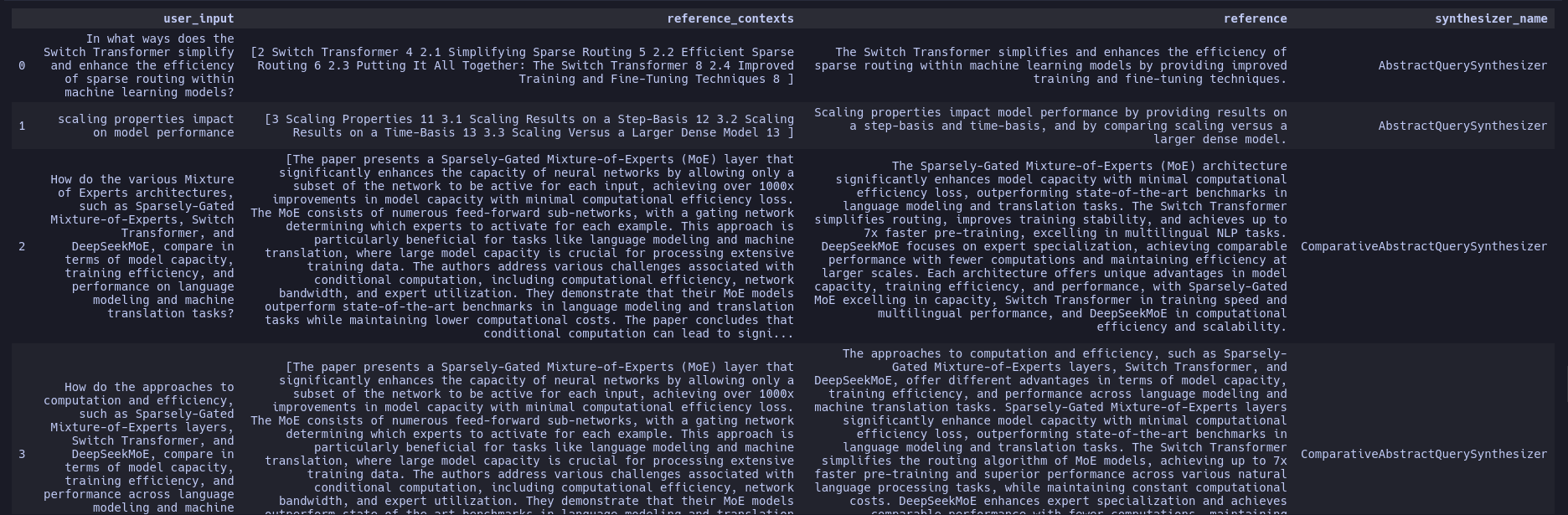
Each sample records where its reference contexts came from. The
reference_contexts_metadata column holds the metadata of the source
document for each reference context, in the same order, e.g.
[{"source": "docs/intro.md"}]. The column stays in place through
to_dataset() and appears next to the scores in the
metrics_experiment result's to_pandas(), so you can group scores by source file. Dates and other
values that JSON can't hold are stored as strings.
What the columns are for
A generated sample holds the question and its ground truth. It doesn't hold your system's output.
| Column | What it is | Used by |
|---|---|---|
user_input |
The generated query. | Your app, as its input. |
reference |
The reference answer, written from the reference contexts. | ContextRecall, ContextPrecision, FactualCorrectness and other reference-based metrics. |
reference_contexts |
The chunks the query and answer were written from: one chunk for single-hop queries, several for multi-hop. These are the contexts a perfect retriever would return. | NonLLMContextRecall, NonLLMContextPrecisionWithReference. |
reference_contexts_metadata |
The source document's metadata for each reference context. | Grouping scores by source. |
persona_name, query_style, query_length, synthesizer_name |
How the query was generated. | Filtering and analysis. |
To evaluate, run your app on each user_input and fill in response and
retrieved_contexts with what it returns.
reference_contexts is ground truth for retrieval. The non-LLM context
metrics compare your retrieved contexts with it by string similarity, so a
retriever that returns the source chunk scores well and one that misses it
scores 0. The LLM-based ContextRecall and ContextPrecision judge the
retrieved contexts against reference instead, and don't read
reference_contexts.
Running the async examples
The examples on this page use await at the top level. That works as is in Jupyter, IPython and other notebooks. In a plain Python script, put the code in an async function and run it with asyncio.run:
import asyncio


async def main(): ...  # the example code, including its `await` lines


asyncio.run(main())
Metrics also have synchronous forms (metric.score(...), metric.batch_score(...)) that you can call directly from a script.
import asyncio

from ragas.metrics.collections import NonLLMContextRecall

# reference_contexts: the chunk a generated query was written from
reference_contexts = [
    "The Eiffel Tower was completed in 1889 for the World's Fair in Paris."
]
# retrieved_contexts: what your retriever returned for that query
retrieved_contexts = [
    "The Eiffel Tower was completed in 1889 for the World's Fair, in Paris.",
    "Paris is the capital and most populous city of France.",
]


async def main():
    metric = NonLLMContextRecall()
    result = await metric.ascore(
        retrieved_contexts=retrieved_contexts,
        reference_contexts=reference_contexts,
    )
    print("Context recall:", result.value)

    missed = await metric.ascore(
        retrieved_contexts=retrieved_contexts[1:],
        reference_contexts=reference_contexts,
    )
    print("Without the source chunk:", missed.value)


asyncio.run(main())
Output:
Chunking
The reference contexts are the generator's chunks, made by its transforms
(such as HeadlineSplitter), not your retriever's. If your retriever splits
documents differently, its contexts won't equal the reference contexts
exactly. The similarity-based metrics above tolerate small differences;
for very different chunking, use the LLM-based metrics with reference.
ID-based metrics (IDBasedContextRecall) work only if you map the
generator's chunks to your own chunk IDs.
A Deeper Look
Now that we have a seen how to generate a testset, let's take a closer look at the main components of the testset generation pipeline and how you can quickly customize it.
At the core there are 2 main operations that are performed to generate a testset.
- KnowledgeGraph Creation: We first create a KnowledgeGraph using the documents you provide and use various Transformations to enrich the knowledge graph with additional information that we can use to generate the testset. You can learn more about this from the core concepts section.
- Testset Generation: We use the KnowledgeGraph to generate a set of scenarios. These scenarios are used to generate the testset. You can learn more about this from the core concepts section.
Now let's see an example of how these components work together to generate a testset.
KnowledgeGraph Creation
Let's first create a KnowledgeGraph using the documents we loaded earlier.
Outputand then add the documents to the knowledge graph.
from ragas.testset.graph import Node, NodeType

for doc in docs:
    kg.nodes.append(
        Node(
            type=NodeType.DOCUMENT,
            properties={
                "page_content": doc.page_content,
                "document_metadata": doc.metadata,
            },
        )
    )
Now we will enrich the knowledge graph with additional information using Transformations. Here we will use default_transforms to create a set of default transformations to apply with an LLM and Embedding Model of your choice. But you can mix and match transforms or build your own as needed.
from ragas.testset.transforms import default_transforms, apply_transforms


# define your LLM and Embedding Model
# here we are using the same LLM and Embedding Model that we used to generate the testset
transformer_llm = generator_llm
embedding_model = generator_embeddings

trans = default_transforms(
    documents=docs, llm=transformer_llm, embedding_model=embedding_model
)
apply_transforms(kg, trans)
apply_transforms changes kg in place and stops at the first failure. If a
step fails, it raises that error without running the remaining steps, and kg
keeps whatever the completed steps added. To retry, start again from a fresh
knowledge graph.
default_transforms picks its steps by document length:
- If at least a quarter of the documents are over 500 tokens, documents are split into chunks by their headlines.
- Otherwise, any document over 100 tokens is enough for the steps that work on whole documents.
- If every document is 100 tokens or shorter, it raises an error. If your
input is already chunked, use
generator.generate_with_chunks(...), which skips splitting.
Now we have a knowledge graph with additional information. You can save the knowledge graph too.
Output
Testset Generation
Now we will use the loaded_kg to create the TestsetGenerator.
from ragas.testset import TestsetGenerator

generator = TestsetGenerator(
    llm=generator_llm, embedding_model=embedding_model, knowledge_graph=loaded_kg
)
We can also define the distribution of queries we would like to generate. Here lets use the default distribution.
from ragas.testset.synthesizers import default_query_distribution

query_distribution = default_query_distribution(generator_llm)
Output
[
    (SingleHopSpecificQuerySynthesizer(llm=llm), 0.5),
    (MultiHopAbstractQuerySynthesizer(llm=llm), 0.25),
    (MultiHopSpecificQuerySynthesizer(llm=llm), 0.25),
]
Now we can generate the testset.
testset = generator.generate(testset_size=10, query_distribution=query_distribution)
testset.to_pandas()